
Homeschool Workbox Systems: Organize Learning for 2026
Homeschool days fall apart in the transitions — the ten minutes hunting for the math manipulatives, the "what do I do next?" asked six times before lunch. A workbox system fixes that by turning your whole day into a sequence of self-contained, grab-and-go tasks. This guide walks through what the method is, how to set one up, and how it fits into a wider approach to homeschool organization that actually holds up over a full year.
Quick Answer
A homeschool workbox system is a modular organization method where each subject or task lives in its own labeled box, bin, or folder, holding everything the child needs to complete it. The child works through the boxes in order, which lets them see their whole day at a glance and move between tasks without asking what comes next. It suits Pre-K through middle school, adapts to any curriculum, and can be as simple as five stacked drawers or as detailed as a color-coded shelf.
TL;DR
- Workboxes break the school day into visible, finishable chunks, which supports independence and executive function skills. See how the method actually works
- The biggest wins are fewer transition arguments and clearer expectations, not just tidier shelves. Read the full list of benefits
- You can start with three to five boxes and a stack of labels — no special purchase required. Follow the step-by-step setup
- Resistance, mess, and over-planning are the three most common failure points, and each has a straightforward fix. Troubleshoot the usual problems
- Digital planning and physical boxes work well together: the plan decides what goes in, the boxes deliver it. Compare the hybrid approach
In This Article
- What is a Homeschool Workbox System, Anyway?
- Why Use a Homeschool Workbox System? The Benefits for You and Your Child
- Setting Up Your Homeschool Workbox System: A Step-by-Step Guide
- Workbox Variations: Finding the Right Fit for Your Family
- Common Workbox Challenges and Friendly Fixes
- Beyond the Boxes: Integrating Workbox Principles for Holistic Homeschool Organization
- Blending Workboxes with Digital Tools: The 2026 Edge
- Your Homeschool, Organized and Joyful: What's Your Next Step?
What is a Homeschool Workbox System, Anyway?
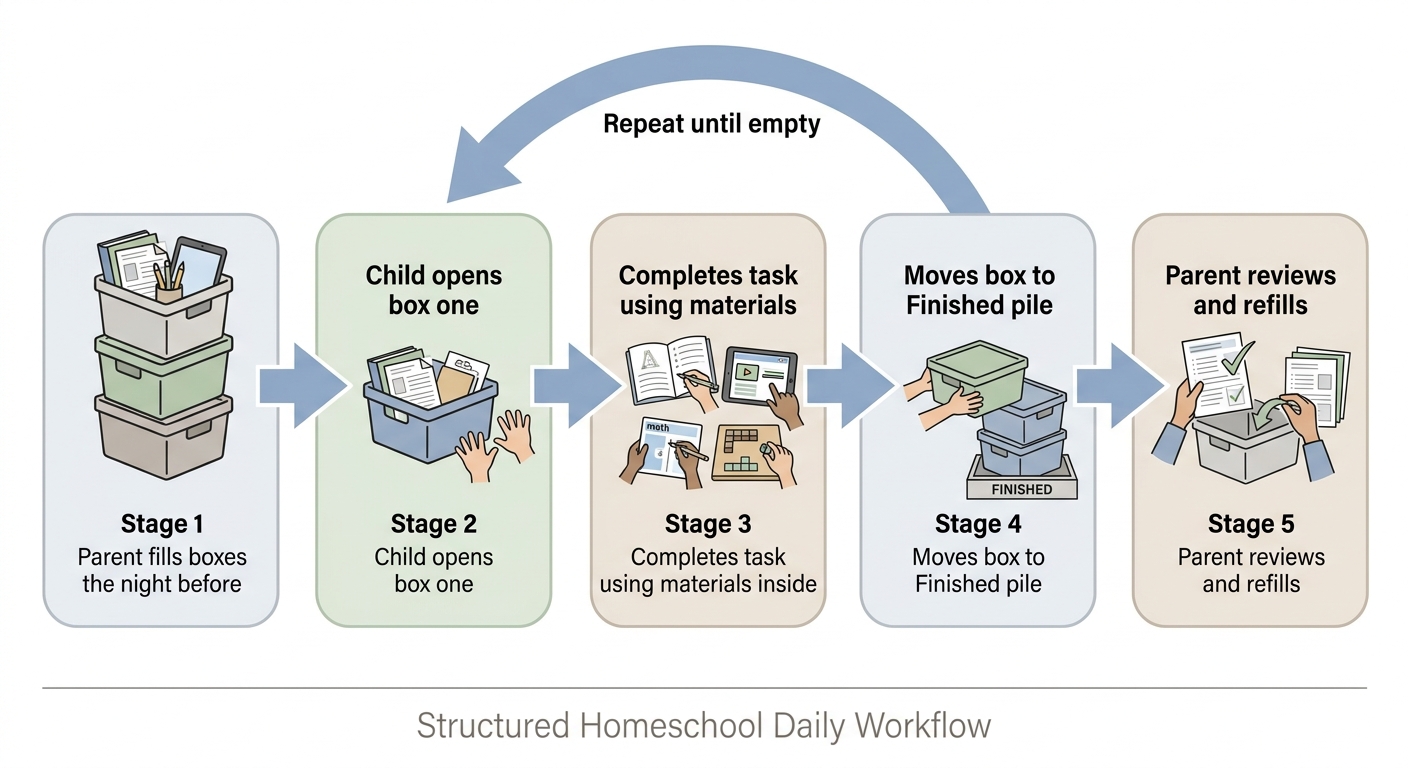
A workbox system is a visual organization method that splits the school day into separate containers, with one task per container and every material for that task inside it. The child works from box one to box last, and the empty boxes show how much of the day is done.
The workbox method rests on one simple idea: a task the child can see and reach is a task they can start without you.
Here's what it looks like in practice. Box one holds the math lesson — the textbook open to the right page, a pencil, the counting bears, and the practice sheet. Box two holds a reading assignment: the chapter book, a bookmark, and three comprehension questions on an index card. Box three holds a handwriting page. Box four holds a nature journal and colored pencils.
No hunting. No "where's the ruler?" No waiting for you to finish with a sibling before anything can begin.
Three terms come up constantly once families start swapping setups, so they're worth pinning down:
- A workbox is a single container holding one complete task — the assignment, the tools, and anything the child would otherwise have to go looking for.
- A choice box is a slot offering two or more options the child picks between, which keeps genuine self-direction inside a structured sequence.
- A finished bin is the destination where completed boxes go, giving every task a clear physical end point rather than a vague "are you done yet?"
The system was popularized among homeschooling families as a way to give young learners a sense of sequence and completion. It has since been adapted endlessly — some families use hanging file folders, some use rolling carts, some use a shelf of magazine holders. The container matters far less than the principle behind it.
Why Use a Homeschool Workbox System? The Benefits for You and Your Child
The main benefit is that it moves the "what's next?" decision from you to the child. Once boxes are filled, the sequence is already decided, so your morning is spent teaching rather than directing traffic.
Families who use a homeschool workbox setup commonly report a few consistent advantages:
- Visible progress — A child who can see four boxes left knows exactly how much day remains. Abstract time is hard for young learners; stacked bins are not.
- Fewer transition battles — The friction point in most homeschool days isn't the work itself, it's the gap between tasks. Boxes remove the gap.
- Clearer expectations — What's in the box is the assignment. There's no negotiating about scope, because the scope is physical.
- Independence at a child's own pace — A fast worker can move ahead. A slower worker isn't rushed by a sibling finishing first.
- Less parental micromanaging — You prepare once, in advance, instead of directing continuously all day.
- Built-in prep discipline — Filling boxes forces you to notice on Sunday that you're out of graph paper, rather than at 9:15 on Tuesday.
If you want something more concrete than "it feels smoother," measure it yourself before you build anything. For two ordinary school days, note the clock each time a task ends and each time the next one genuinely starts. Add up the gaps. That number is your transition cost, and it's the single figure a workbox system is designed to shrink — re-run the same two-day check a fortnight after setup and you'll know whether the method is earning its shelf space in your house specifically.
Does it really build independence, or just compliance?
Both, honestly, and the balance depends on how you use it. A box that contains a worksheet and nothing else trains compliance. A box that contains an open-ended prompt, a few materials, and room to choose builds something closer to genuine self-direction.
The strongest versions include a mix: some boxes with required work, some with a choice of two activities, and at least one box that's purely the child's own project. That mix is also what makes the system pair well with simple homeschool planning — the boxes carry out the plan, but they don't have to make every decision for the child.
Key takeaway: Workboxes don't add structure to your day — they make the structure you already have visible to the child, which is what lets them run it themselves.
Setting Up Your Homeschool Workbox System: A Step-by-Step Guide
Start smaller than you think you need. Most families who abandon the system did so because they built a twelve-box behemoth in week one and couldn't sustain the prep.
Here's a setup order that holds up.
1. Count your realistic tasks. Write out what your child actually does in a typical day. Not the aspirational list — the real one. Most days have between four and eight distinct activities.
2. Choose containers you already own. Shoeboxes, magazine files, plastic drawer units, hanging folders, or gallon zip bags all work. Clear containers help younger children; folders work better for older ones with mostly paper-based work.
3. Number them, don't label them by subject. Numbered boxes let you reorder the day freely. Subject labels lock you in and require relabeling every time the schedule shifts.
4. Fill each box completely. Every pencil, every manipulative, every page. If the child has to leave the table to find something, the box has failed at its one job.
5. Add a "finished" destination. An empty bin, a shelf, or a basket where completed boxes go. This turns cleanup into the reward signal that ends each task.
6. Do a trial run of three days. Not three weeks. Three days tells you whether the number of boxes matches your child's stamina.
How many boxes should each age get?
| Age range | Suggested starting boxes | Typical box contents |
|---|---|---|
| Pre-K to K | 3–4 | Short hands-on activity, one book, a fine-motor task |
| Grades 1–3 | 5–6 | Core subject, practice page, read-aloud, one choice box |
| Grades 4–6 | 6–8 | Independent reading, math, writing, project work, review |
| Grades 7–8 | Folder system, 5–7 slots | Assignment sheets, checklists, longer-form projects |
These are starting points, not rules. A child who's finishing everything by 10 a.m. needs more; a child melting down at box four needs fewer.
What does a filled set of boxes actually look like?
Here are two real-shape examples — one for an early reader, one for an upper-elementary student — so you can see the level of detail that makes a box work.
A six-year-old, five bins:
- Math — the lesson page torn from the workbook, a pencil, twenty counting bears in a snack bag, and a ten-frame card.
- Phonics — a set of blending cards held with a rubber band, a small whiteboard, and one dry-erase marker that still works.
- Read-aloud (with you) — the chapter book with a sticky note on today's chapter, plus a bookmark.
- Handwriting — one traced page, a fat pencil, and a sticker to add when it's done.
- Choice box — playdough and letter stamps, or the magnet tiles. Child picks.
A ten-year-old, six numbered folders in a crate:
- Math — lesson printout, two practice pages, a scrap page for working, and the answer key in a sealed envelope for self-checking.
- Writing — a paragraph prompt on an index card, a draft page, and a three-line revision checklist.
- Independent reading — the current novel and a reading log with the date already written in.
- Science project — the seed jars stay on the windowsill; the folder holds the observation sheet, a ruler, and the question to answer today.
- Review — a spiral-review sheet mixing last month's topics.
- Choice folder — coding challenge printout, sketchbook prompt, or a logic puzzle page.
Notice what's missing from both lists: nothing. No "get the ruler from the drawer," no "ask Mum which page." That completeness is the entire difference between a workbox and a pile.
What goes in the restock caddy?
A restock caddy is a single small container of consumables you refill on a fixed day, so filling boxes never turns into a hunt through the house. It stays out of the numbered boxes entirely.
A caddy that covers most elementary weeks holds:
- Sharpened pencils and a hand sharpener
- Lined paper, blank paper, and a few sheets of graph paper
- Index cards, sticky notes, and a glue stick
- Two dry-erase markers and a small eraser cloth
- Sticker sheets or whatever your child treats as a finish signal
Check it on the same day each week — Sunday afternoon for most families — and top up whatever dropped below a week's worth. That five-minute habit prevents the single most common mid-week collapse.
⚠️ Resist the urge to fill boxes a full week ahead. Life interrupts, a lesson runs long, and by Wednesday you're either rearranging everything or ignoring your own system. Fill the night before, or two days ahead at most.
Workbox Variations: Finding the Right Fit for Your Family
There is no single correct workbox system. The format should match your space, your child's age, and how your family actually learns.
| Variation | Best for | How it works | Watch out for |
|---|---|---|---|
| Stacked bins or drawer cart | Ages 4–9, hands-on work | Numbered drawers, one task each | Takes floor space |
| Hanging file folders | Grades 4–8, paper-heavy work | One folder per subject or slot | Not suited to manipulatives |
| Wall pockets | Small homes, apartments | Fabric pockets hold thin materials | Limited capacity |
| Digital checklist boards | Independent older students | Columns for To Do / Doing / Done | Needs a device and a habit |
| Themed unit boxes | Project-based or unit-study families | Everything for one topic in one bin | Requires more upfront prep |
| Travel pouches | Roadschooling and travel | Zip pouches per subject | Restock discipline required |
Match the format to your child's different learning styles as well. A child who processes best through movement will do better with bins holding physical objects than folders holding worksheets. A verbal learner might do fine with a folder plus a recorded prompt.
For preschoolers, keep it tactile and short — three bins with a puzzle, a book, and a sensory tray is a complete morning. For a seventh grader, the "boxes" might just be five labeled folders and a checklist taped to the inside of a binder. Same principle, different scale.
Here's what that middle-school version looks like filled in — a thirteen-year-old, five slots in a single binder:
- Algebra — the assigned problem set, a printed worked example for reference, and the answer key for self-marking after.
- Literature — the novel with a sticky note at today's stopping point, plus three discussion questions to answer in the notebook.
- Long-form project — a one-page milestone sheet ("draft the second section today"), not the whole project, so the slot has a visible finish line.
- Language or review — vocabulary list, a ten-minute practice sheet, and the timer.
- Choice slot — coding tutorial printout, a documentary link written on a card, or free reading.
The difference from an eight-year-old's crate is that each slot names a stopping point rather than a completed page. Older students stall on open-ended work, so the box's job shifts from holding materials to defining "done for today."
A travel example makes the flexibility clearer. A family living out of a van or moving between rentals can run the same system with six flat zip pouches in a single tote: one per subject, restocked from a shoebox of consumables every Sunday. The pouches go on the picnic table, the hostel bunk, or the back seat, and the "finished" destination is simply the empty side of the tote. No shelving required — just the same one-task-one-container rule.
Common Workbox Challenges and Friendly Fixes
Most workbox systems fail in one of four predictable ways. All four are fixable.
- The child refuses to use it. Usually a control issue, not a system issue. Bring them into the setup — let them choose the bin colors, write the numbers, and pick which box goes first tomorrow. Ownership resolves most resistance.
- The boxes turn into a mess. Add the "finished" bin if you skipped it, and make the last five minutes of the day a reset routine you do together. A system without a reset step degrades within a week.
- You over-planned and can't keep up. Cut the box count by a third. A system you fill consistently beats a better system you fill twice.
- You run out of materials mid-week. Keep a small restock caddy with the consumables you burn through — pencils, glue sticks, lined paper, index cards. Refill it on the same day each week.
A typical version of the over-planning failure: a parent sets up eight bins for a first grader in September, complete with a laminated schedule strip. By the second Thursday, boxes six through eight are still full at dinner, the child has learned that finishing is impossible, and the whole cart gets pushed against the wall. Dropping to five bins — the same content, minus two worksheets and one "extra" reading task — usually restarts the system within a day, because the child can see an end point again.
You can catch that failure before it hardens by counting instead of guessing. For one week, write down how many boxes are still full at dinner each day. If two or more go unfinished on three days out of five, the box count is wrong — not the child's attitude. Cut one box and run the same five-day count again. This is the second number worth tracking, alongside the transition cost from earlier, and both take under a minute a day to record on the back of a lesson plan.
What if the whole system stops working after a month?
That's normal, and it usually means your child outgrew the format rather than the method. A seven-year-old who needed six bins in September may need four folders and a checklist by January.
Treat the setup as something you revisit each term, not something you build once. Ask your child directly what they'd change — their answers are often more practical than yours.
Key takeaway: Workbox systems break down from over-ambition far more often than from under-planning. When in doubt, remove a box.
Beyond the Boxes: Integrating Workbox Principles for Holistic Homeschool Organization
The underlying principle — one task, one container, everything included — works far outside of schoolwork. Once you've seen it reduce friction in your school day, it's worth applying to the rest of the household load that sits on the same shoulders.
A few extensions families use:
- Chore boxes. A bin holding the cloth, the spray bottle, and the card describing the job. Removes the "how do I do it?" step that stalls most chore charts.
- Independent project crates. One crate per ongoing personal project, so a half-built model or a knitting piece doesn't have to be cleared away and rebuilt each day.
- Morning basket, boxed. The read-aloud, the poetry book, the map, and the candle in one carry-handle bin. It moves to the porch, the car, or the kitchen table without a scavenger hunt.
- Sibling-shared tubs. For multi-age lessons, one tub holds the shared read-aloud and map while each child's individual response work lives in their own numbered box.
That last one is worth dwelling on. Multi-age teaching gets chaotic when three children need three different things at the same moment. Modular containers let the shared portion stay shared and the differentiated portion stay separate, without you narrating the difference all morning.
In practice that might look like this: one shared tub holds the geography read-aloud and a laminated map. After the group reading, the nine-year-old opens her box to a labeling worksheet, the six-year-old opens his to a coloring map and a pack of crayons, and the four-year-old gets a puzzle of the same continent. One lesson, three levels, zero mid-morning printing.
Blending Workboxes with Digital Tools: The 2026 Edge
Physical boxes solve delivery. They don't solve deciding what goes in them. That decision — what should this child work on tomorrow, at what level, in what order — is the part that eats parents' evenings, and it's where a digital layer earns its place.
A sensible hybrid split looks like this:
| Job | Handled by | Why |
|---|---|---|
| Deciding tomorrow's tasks | Digital plan | Sequencing and level-matching happen once, centrally |
| Holding the materials | Physical boxes | Child can act on it without a screen |
| Signaling progress to the child | Physical boxes | Empty bins are more motivating than a status bar |
| Recording what was covered | Digital records | Needed for reporting, portfolios, transcripts |
| Spotting gaps across the term | Digital plan | Patterns aren't visible day to day |
Keep the child's experience analog and the parent's admin digital. That's the whole trick. The moment you push the child onto a screen to check what's in box three, you've lost the reason the boxes worked.
How does digital planning feed the physical boxes?
You plan on the screen, then print or gather what the plan names, then load the boxes. The plan tells you the objective, the materials, and roughly how long it should take. The box carries it out.
This is also where the weekly prep burden lives — the Sunday-night stretch spent deciding what each child needs next, pulling worksheets together, and then writing down afterward what actually got covered. LearnSpark builds that daily plan for you, generating personalized lesson scripts with the materials list and learning outcomes for each child's level and interests, and keeping the mastery records updated as you teach. Your prep time goes into filling the bins rather than designing the lessons, and there's no separate record-keeping session waiting for you after the school day ends.
The digital side also makes it easier to track student progress across a term, which is difficult to see when your only record is a pile of finished worksheets in a box.
Key takeaway: Let the screen do the planning and the record-keeping. Let the boxes do the teaching day.
Your Homeschool, Organized and Joyful: What's Your Next Step?
Good homeschool organization isn't about owning the right bins. It's about removing the small decisions that drain your attention before 10 a.m., so the attention you have left goes to the child in front of you.
Start this week with three boxes and one child. Fill them tonight. See what happens tomorrow morning, adjust the count, and repeat. That's the entire on-ramp.
If the workbox method clicks for your family, the natural next step is tightening what actually goes into the boxes — which is a question of homeschool lesson plans rather than containers.
Key takeaway: A workbox system is a delivery mechanism. It makes a good plan easier to run, and it makes a missing plan obvious fast.
Key Takeaways
The short version of everything above, in case you're skimming before bedtime prep:
- A workbox system is one task per container, fully stocked. If the child has to leave the table to find something, the box isn't finished.
- Number the boxes, don't label them by subject. Numbers let you reorder the day without relabeling anything.
- Start with three to five boxes and a three-day trial. Adjust the count based on where your child's stamina actually runs out, not where you hoped it would.
- Completeness beats containers. Shoeboxes, folders, wall pockets, and zip pouches all work; a half-filled premium cart doesn't.
- Add a "finished" destination and a five-minute reset. Without them, the system turns into clutter inside a week.
- Track two numbers, not vibes. Your transition cost and your unfinished-box count tell you whether the system is working better than any general advice can.
- Revisit the format each term. Outgrowing six bins for four folders is progress, not failure.
- Keep the child analog and the parent digital. Plan and record on a screen; deliver and motivate with physical boxes.
Frequently Asked Questions
Are workboxes only for young children?
No. The format changes with age, but the principle holds through middle school. Younger children usually need physical bins with visible materials, while older students often do better with numbered folders, a checklist, and longer multi-day assignments in each slot.
How do I store materials not currently in use?
Keep a single "staging" shelf or closet with everything not in today's rotation, organized by subject rather than by day. Then keep a small consumables caddy — pencils, paper, glue, index cards — separate from it, restocked on a fixed day each week. This stops you from raiding tomorrow's boxes for today's missing pencil.
Can I use a workbox system with multiple children?
Yes, and it's one of the strongest use cases. Give each child their own numbered set, plus one shared container for anything you do together, like a read-aloud or a map study. The shared bin keeps group time genuinely group, while individual bins let each child work at their own level without waiting on a sibling.
What if my child finishes their workboxes quickly?
That's useful information rather than a problem. First check whether the work is too easy — a child racing through everything by mid-morning may need harder or longer tasks rather than more of them. If the level is right, add a permanent "choice box" holding open-ended options: a project they're building, a stack of library books, art supplies, or a logic puzzle set.
How long does filling the boxes take each night?
Less than most parents expect once the routine settles, and far less if your lesson plan already names the materials. Budget a short window after dinner — roughly the length of a load of dishes — and treat it as a physical task rather than a planning task. If filling the boxes regularly turns into deciding what to teach, that's a signal your planning step needs to move earlier in the week, not that the boxes are too much work.
Do I need to buy a special workbox cart?
No. The commercially sold carts are convenient, not necessary. Families run the same system successfully with shoeboxes, cereal-box magazine files, a hanging shoe organizer on the back of a door, plastic envelopes from a stationery aisle, or a milk crate of labeled folders. Spend on the consumables you actually run out of before you spend on furniture.
How do I handle boxes that need me, like a read-aloud?
Mark them clearly and place them where they suit your morning. A colored sticker, a clothespin, or a card reading "with Mum" on the front of the bin tells the child at a glance which tasks they can start alone. Most families put one parent-led box early, while attention is fresh, and keep the rest independent so the child never stalls waiting on you. If a child hits a "with Mum" box while you're mid-lesson with a sibling, the standing rule is simple: skip it, move to the next number, come back.
Do workboxes work for unschooling or interest-led families?
Yes, with a change in what fills them. Instead of assignments, the boxes hold invitations: a bin with the microscope and three prepared slides, a pouch of watercolor supplies, a crate holding the bread ingredients and a recipe card. The container still does its job — everything ready, nothing to hunt for — while the child decides whether, when, and how long to engage. Numbered order becomes optional in this version; completeness does not.
Information about third-party platforms reflects publicly available details at the time of writing and may have changed. Please verify directly with the provider. See our Terms of Use for more.