
If your AdaptedMind login stopped working ten minutes before math time, the fix is usually smaller than it feels — a mismatched email, an expired reset link, or a child trying to sign in where only a parent can. This guide walks through sign-in, the free trial, billing line items, and a clean cancellation, so you can sort the account out fast and then decide whether the subscription still earns its place.
Quick Answer
AdaptedMind accounts are managed on the provider's website using the parent email entered at signup. Sign in from the "Log In" link, then choose your child's profile — children don't get a separate email login. Forgotten passwords are fixed through the emailed reset link, which expires. Free trial status, plan changes, payment details and cancellation all live in the parent account's billing area, never inside a child profile.
TL;DR
- One parent account, several child profiles. Most "my kid can't log in" problems are profile-selection issues, not password issues. See how the sign-in sequence works
- Sign-in failures cluster around four causes — wrong email, browser autofill, expired reset link, or a lapsed subscription. Check the troubleshooting table
- A free trial with a card on file converts to a paid plan unless you cancel first. Set a reminder the day you sign up. Follow the trial checklist
- Your billing page is the only price that matters — not the marketing page, not a forum thread. Read your subscription line item
- Cancel from the parent account before the renewal date, and keep the confirmation email. Walk through the cancellation steps
In This Article
- How Does the AdaptedMind Login Actually Work?
- Why Won't My AdaptedMind Login Work?
- How Do You Start and Manage the Free Trial?
- Where Do You Check Your Plan, Price and Payment Details?
- How Do You Cancel or Pause Without Getting Charged Again?
- What Do Parent Reviews Actually Say?
- What Should You Do If You're Rethinking the Subscription?
- Frequently Asked Questions
How Does the AdaptedMind Login Actually Work?
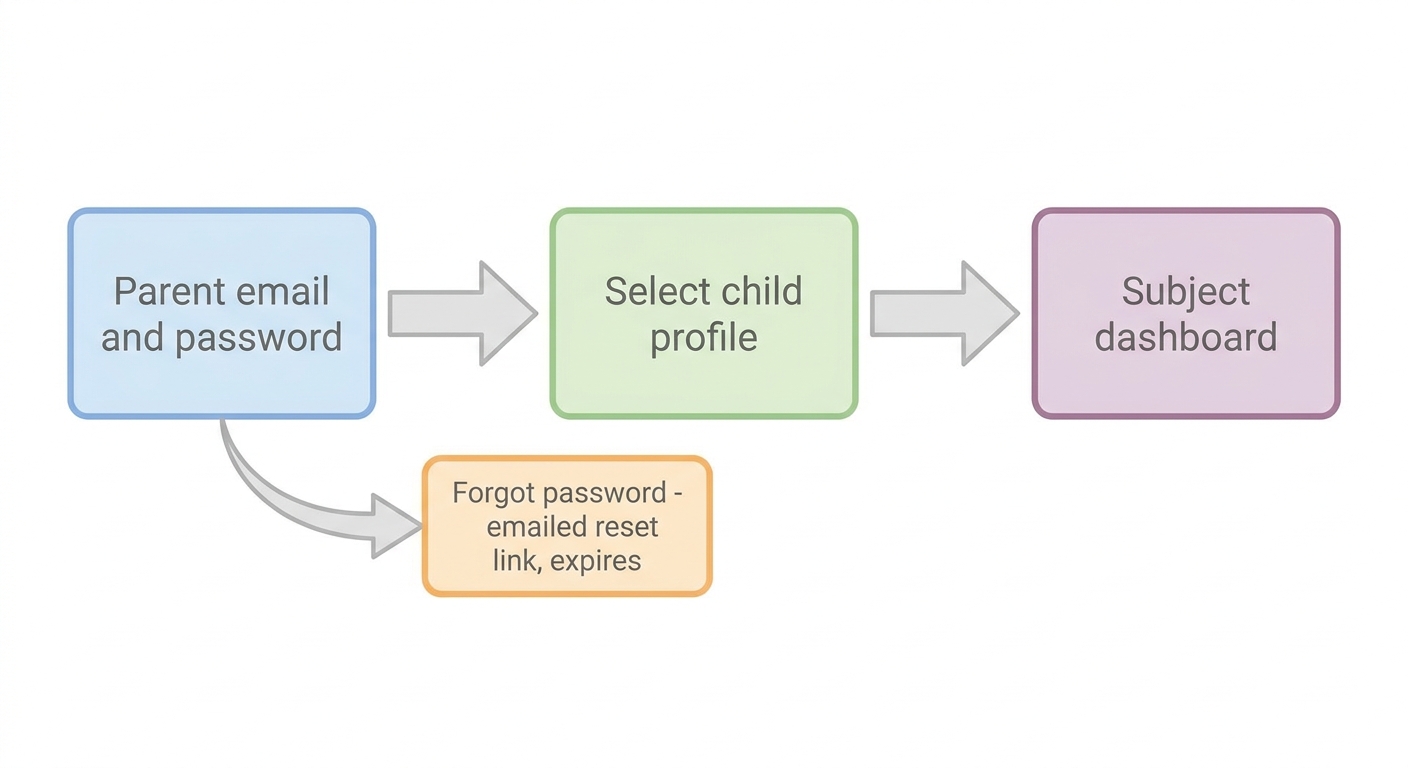
There is one adult login and one or more learner profiles sitting underneath it. You sign in with the parent email and password, then pick the child, then land on the subject dashboard.
A parent account is the billing-level login that controls the subscription, payment method and every child profile attached to it. A child profile is a learner view that holds progress and practice history but has no access to payment settings. That split is why account problems and login problems feel similar but are fixed in completely different places.
The usual sequence looks like this:
- Go to the provider's website and open the "Log In" link.
- Enter the parent email used at signup, plus the password.
- Select the child profile you want to work in.
- Choose the subject — the platform's own site describes a K-6 maths curriculum as research-based and common core aligned, as published on adaptedmind.com and accurate as of September 2026.
There is also a second sign-in surface. Apple's App Store lists an AdaptedMind maths learning app for iOS, with its own ratings and reviews page, as of September 2026 (App Store listing). App sign-ins generally use the same parent credentials — so if the web login works and the app doesn't, the account is fine and the app is the problem.
If you're still deciding whether the subscription earns a place in your week, our full AdaptedMind review for 2026 covers the curriculum itself rather than the account mechanics.
Why Won't My AdaptedMind Login Work?
Most failed sign-ins come down to four things: the wrong email address, browser autofill filling an old password, a reset link that has already expired, or a subscription that lapsed without anyone noticing.
Work through the symptom you're actually seeing rather than trying everything at once.
| Symptom | Likely cause | Fix | Time to resolve |
|---|---|---|---|
| "Email not recognised" | Signed up with a different address (work vs personal, or a partner's email) | Search all inboxes for the original welcome or receipt email, then use that address | 2-5 minutes |
| Reset email never arrives | Filtered into spam or the promotions tab | Check spam, promotions and archive; allowlist the sender domain; request one new link and use it immediately | 5 minutes |
| Reset link says invalid or expired | Links are time-limited and single-use | Request a fresh link and click it in the same browser session, not from a different device | 2 minutes |
| Password rejected but you're sure it's right | Browser autofill inserting an old saved password | Clear the field manually, type the password, disable autofill for that field | 2 minutes |
| Works on the web, fails in the app | Outdated app version or stale cached session | Force-quit, update the app, sign out and back in | 5-10 minutes |
| Child can't get in | Child is trying to log in directly instead of through the parent account | Sign in as parent first, then hand over at the profile-selection screen | 1 minute |
| "Account expired" or dashboard locked | Trial converted, card declined, or subscription ended | Check the parent billing page and the card's expiry date | 5 minutes |
Two extra moves solve a surprising share of stubborn cases. First, try a private or incognito window — it bypasses every saved cookie and autofill entry in one step. Second, try a different network; a school or library filter can block parts of a learning platform without showing a clear error.
If nothing works, contact support in writing rather than by phone, and include the parent email, the approximate signup date and the exact error text. A written thread gives you a timestamp you can point to later if a charge is disputed.
Key takeaway: Before you assume the account is broken, confirm which email you signed up with and whether a parent or a child is doing the signing in — those two checks resolve most access problems.
For broader help choosing and running the apps in your week, our homeschool teaching tools and tech hub collects reviews and setup guidance in one place.
How Do You Start and Manage the Free Trial?
The trial is started inside the signup flow with a payment card on file, and it rolls into a paid subscription automatically unless you cancel before it ends. That single sentence explains most billing complaints about any subscription learning app.
Trial length and terms are set by the provider and have varied over time, so read the terms shown on the signup page at the moment you enter your card details rather than trusting a coupon site or an older blog post.
What should you do during a trial?
- Day one — note the exact renewal date in your phone calendar, with an alert two days before. Screenshot the confirmation email.
- Day one — set up every child profile you'd actually pay for, not just the eldest. A trial that only tests one child tells you half of what you need.
- Mid-trial — sit with your child through a full session in each subject you're considering. Engagement on day two is not the same as engagement on day ten.
- Mid-trial — check whether it's replacing work you were already doing, or adding a new task to your day.
- Two days before expiry — open the parent billing page and confirm the plan, the price and the renewal date. Decide then, not on the morning of.
- After the decision — whether you keep or cancel, save the confirmation email.
⚠️ Watch the auto-renewal. A free trial that requires a card is a paid subscription with a delay attached. If you're not certain you'll keep it, cancel early — access typically continues to the end of the trial period anyway.
Curious what you're actually evaluating during those days? What the platform includes for K-6 maths and reading breaks down the content side.
Where Do You Check Your Plan, Price and Payment Details?
Your plan, price and payment method sit in the parent account's subscription or billing section, and the line item shown there is the only price that matters. Marketing pages, forum threads and year-old reviews all describe what someone else paid at some point.
Read the line item for four things:
- Who it covers — one child, several children, or a specific subject
- Billing cycle — monthly or annual, and whether an annual discount already applied
- Next renewal date — the date the card gets charged, not the date you signed up
- Amount — the exact figure, including any promotional rate that expires
Pricing around $9.95 per child per month has been widely reported for AdaptedMind, including in AdaptedMind cost per month and annual pricing as published in 2026. Prices and plan structures change, so treat any published figure as a starting point and confirm the number in your own billing page.
Confusion about what the fee covers is common enough to show up in homeschool communities. In a public Texas homeschool group thread, a parent asked whether the platform was "worth paying 10 dollars a month per subject" (Facebook group post, viewed September 2026). Whether your own account bills per child, per subject, or both is answerable in thirty seconds from the billing page — and that check is worth doing before renewal rather than after.
Keep a simple record: a screenshot of the billing page each time anything changes. If a charge ever looks wrong, a dated screenshot plus the original confirmation email is a far stronger position than a memory.
How Do You Cancel or Pause Without Getting Charged Again?
Cancel from the parent account's subscription settings before the renewal date. Cancelling normally ends access at the end of the period you've already paid for, rather than instantly, but confirm what your own account says when you click through.
The clean sequence:
- Sign in as the parent on the website — not inside a child profile.
- Open account settings, then subscription or billing.
- Select cancel, and read any retention offer before accepting or declining it.
- Confirm, then wait for the cancellation email. No email means it may not have gone through.
- Screenshot the post-cancellation status page.
- Check your card or bank statement on the next billing cycle to confirm no charge landed.
If the cancel option isn't visible where you expect it, don't keep clicking. Send a written support request that states the parent email, the subscription, and that you are requesting cancellation effective before the next renewal date. Keep the timestamp.
⚠️ If you subscribed through an iOS app, check Apple too. Subscriptions purchased inside an app are generally managed through the Apple ID subscription settings rather than the provider's website. Cancelling on a website does not cancel a separate app-store subscription, so verify both places if you're unsure where you signed up.
One more thing worth doing before access ends: export or screenshot progress reports. Practice history is useful evidence for a homeschool portfolio, and it's easier to save it now than to request it later.
What Do Parent Reviews Actually Say?
The consensus across public review sources is roughly "kids enjoy it, parents want clearer billing." That pattern shows up in different places, and it's worth reading each source for what it's good at.
| Source | What it reflects | What it's useful for |
|---|---|---|
| Trustpilot review page | Trustpilot displayed a 4-star average across roughly 1,100 reviews for adaptedmind.com as of September 2026 (Trustpilot) | Overall sentiment and customer-service experiences |
| Apple App Store reviews | Reviewer comments on the maths app listing highlight visuals and child engagement (App Store) | Whether children actually stay with it |
| Homeschool Facebook groups | Parents asking directly about per-subject cost (public group post) | Real budgeting questions from families like yours |
Review counts and averages shift constantly, so check the live pages rather than relying on any figure quoted in an article — including this one.
Read platform reviews with one filter: is the reviewer describing the same job you're hiring the tool for? A parent using it as ten minutes of daily maths practice and a parent using it as a core curriculum will write very different reviews of the same product.
If you're weighing alternatives in the same category, the AdaptedMind vs ABCmouse comparison puts two familiar options side by side.
Key takeaway: Enjoyment reviews and value reviews answer different questions — check the App Store for whether children stick with it, and your own billing page for whether it's worth the money.
What Should You Do If You're Rethinking the Subscription?
Decide which job you're actually trying to fill: practice, or planning. Practice apps drill skills a child has already been taught. They don't tell you what to teach on Tuesday, whether a gap has opened in place value, or what to write in a progress report.
That distinction matters most on Sunday night. If the real cost in your week isn't the subscription fee but the hour you spend stitching together worksheets — and the low background worry about whether anyone is on track — then another practice app doesn't touch the problem.
That's a different kind of tool. A planning system builds the daily lesson from what each child needs next, tracks mastery against your local standards, and keeps the records as you teach, with the child staying off-screen and you doing the teaching. The practical difference is where your evening goes: into the next lesson, or into looking for one. The LearnSpark pricing plans for 2026 show what that looks like for a family covering Pre-K through 8th grade.
Whichever way you go, run the maths on your whole stack, not one line item. Several $10 subscriptions that each solve a slice of the week can quietly add up to more than one tool that covers the week.
Summary
Fixing an AdaptedMind login is usually a five-minute job: confirm the parent email, avoid autofill, request a fresh reset link, and remember that children join through a profile rather than their own sign-in. Everything financial — trial status, plan, price, renewal date and cancellation — lives in the parent account's billing section, and that page overrides any figure you read elsewhere. Save the confirmation emails, screenshot progress before access ends, and decide renewals two days early rather than on the morning of.
Frequently Asked Questions
Can I get one free month of AdaptedMind?
Promotional free months appear from time to time in the signup flow, and retention offers sometimes surface when you begin a cancellation. Neither is guaranteed, and terms change. Check the current signup page terms directly rather than relying on third-party coupon sites, which frequently list offers that have already expired.
Does my child need their own AdaptedMind login?
No. Children work inside a profile attached to the parent account, which is why "my child can't log in" is usually a profile-selection issue rather than a password issue. Sign in with the parent email first, then hand the device over at the profile screen. Child profiles hold progress but not payment access.
Is AdaptedMind billed per child or per subject?
Published pricing has generally been described per child per month, but parents in homeschool groups have raised questions about subject-level charges when adding more than one subject — including a public Texas homeschool group thread viewed in September 2026. Confirm the exact line items on your own billing page before your renewal date.
Can I keep my child's progress data after cancelling?
Export or screenshot progress reports before access ends. Practice platforms rarely guarantee data retention after a subscription lapses, and recovering it later can be slow. Saved reports are also useful evidence for a homeschool portfolio or a year-end review, so it's worth doing even if you plan to resubscribe later.
Information about third-party platforms reflects publicly available details at the time of writing and may have changed. Please verify directly with the provider. See our Terms of Use for more.
Ready to get started? Try LearnSpark free and see the difference for yourself.